Mother Ignoring Kid Drowning In A Pool Meme Template
Make this memeWhat This Format Means
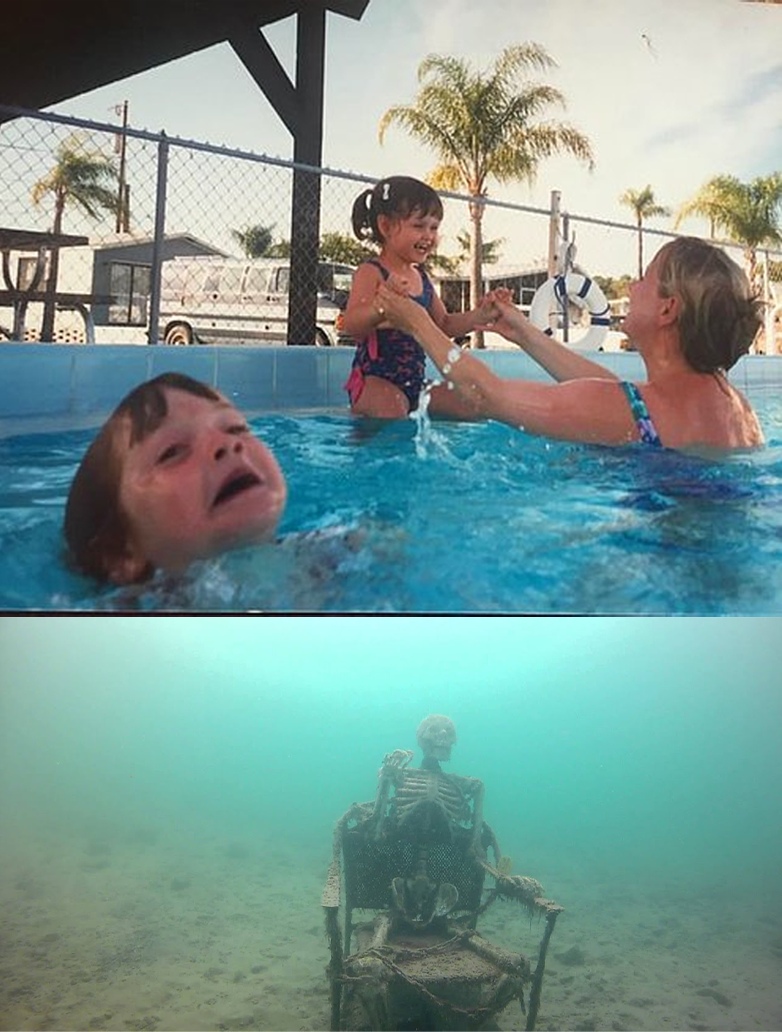
Two stacked photos. In the top a woman happily plays with a smiling girl in a pool while a boy struggles in the water beside them. In the bottom a skeleton sits on the bottom of the pool. Label the woman with someone focused on a new favourite, the girl with that favourite, the struggling boy with what is being ignored, and the skeleton with what was neglected long ago.
When to Use It
- Attention shifting to the newest thing.
- An old project that was forgotten completely.
- Prioritising a shiny distraction over older responsibilities.
Example Captions
- Woman: Me. Girl: New game. Boy: Game I bought last week. Skeleton: Game from last year
- Woman: Me. Girl: New notebook. Boy: Half-used notebook. Skeleton: First notebook
- Woman: Studio. Girl: New series. Boy: Last season's show. Skeleton: The cancelled one
More in Funny & Hilarious, Image Macros.
Related guides: how to make reaction memes, what the Drake Hotline Bling meme means, how to add text to a meme.
Template via Imgflip (imgflip.com). View on Imgflip
Mother Ignoring Kid Drowning In A Pool FAQ
Short answers about meaning, timing, and how to caption this template in Meme Studio.
What does the Mother Ignoring Kid Drowning In A Pool meme mean?
Two stacked photos. In the top a woman happily plays with a smiling girl in a pool while a boy struggles in the water beside them. In the bottom a skeleton sits on the bottom of the pool. Label the woman with someone focused on a new favourite, the girl with that favourite, the struggling boy with what is being ignored, and the skeleton with what was neglected long ago.
When should I use the Mother Ignoring Kid Drowning In A Pool meme template?
Use it for situations like these: Attention shifting to the newest thing. An old project that was forgotten completely. Prioritising a shiny distraction over older responsibilities.
How do I make a Mother Ignoring Kid Drowning In A Pool meme?
Open Make this meme to load the template in the editor. It starts with 4 text boxes; type your lines, drag each one into place, then download a PNG. No account is required. Tip: Four labels are needed; place each one directly on the person or skeleton it describes.
Related Templates
Published templates in the same categories. This is not a popularity ranking.